
The world today has become digital, and video quality is king. Nevertheless, a significant number of creators and organizations possess valuable archive footage, which does not have the required clarity to be used in modern media, such as YouTube, TikTok, or Instagram. Such older clips, whether dedicated historical documents, old advertisements, or family recordings themselves, tend to be grainy, pixellated, or of insufficient resolution to support modern viewing standards.

It is now possible to reuse old material with the help of CapCut and its AI Video Upscaler. Using AI, one would be able to scale up the resolution of a video, include new details, and edit the footage to be suitable for current visually demanding platforms, and to do so, without requiring any complicated software or extended editing knowledge.
In This Article:
Benefits of Using CapCut for Archive Restoration
Speed Without Sacrificing Quality
Conventional restoration tools are slow and may need frame-by-frame editing that is also labor-intensive. Using the CapCut AI video upscaler, you would get a quick turnaround time based on intelligent automation. This makes creators more efficient-ideal when you have strict deadlines or you want to bulk restore.
Beginner-Friendly Interface
CapCut eliminates the sophistication of old video applications. No professional training is needed here–it’s a drag-and-drop interface, live previews, and step-by-step enhancement tools make video editing so simple that it seems like anyone can enjoy it.
All in one workflow
There is no need to hop to platforms. Within CapCut, you are able to create AI voiceovers, cut and edit video clips, subtitle videos, and export high-res files. It is particularly helpful should you seek to produce full stories or pieces of content out of obsolete scenes.
Optimized for Today’s Platforms
CapCut lets you export optimized videos to TikTok, Instagram, YouTube, and other systems. Whether it is vertical short posts or 16:9 HD documentaries, you can resize, upscale, and subtitle your scenes in accordance with the platform requirements.
Cost-Effective and Cloud-Ready
CapCut has a free plan, unlike other traditional video restoration software, which can cost a few hundred dollars. It offers cloud backup as well, meaning that you can work on other devices or interact with your colleagues remotely.
Simple Steps to Upscale Archive Videos Using CapCut
Step 01: Import Archive Footage
Launch CapCut Desktop and start a fresh project. Drop your old footage into the timeline. CapCut has full compatibility with several video formats; hence, you can easily work with older files.

Step 02: Access the Enhance Feature
Select your video clip in the timeline and open the tab “Enhance quality”. In this case, among others, there are such options as AI Video Upscaler that are specifically intended to enhance visual integrity.

Step 03: Choose Upscaling Level
Choose what resolution you want to enhance: 2K, 4K, or more. AI video upscaler understands how to examine and sharpen poorly-shot video, correct lighting issues, and smoothen noise.

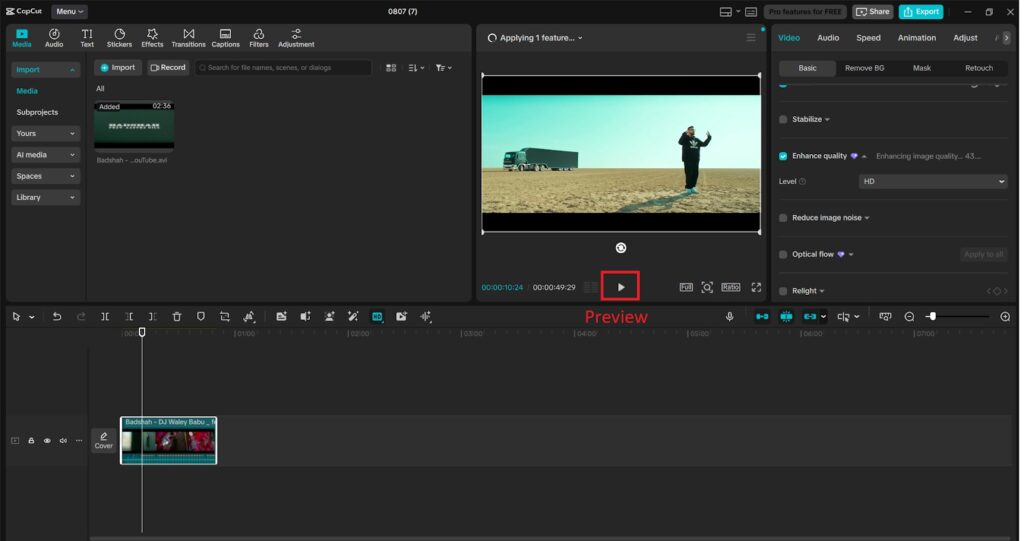
Step 04: Adjust and Preview
You can adjust the brightness, contrast, or saturation before you do it. View the side-by-side difference of the original and the upscaled version using the real-time preview.
Step 05: Export the Upgraded Video
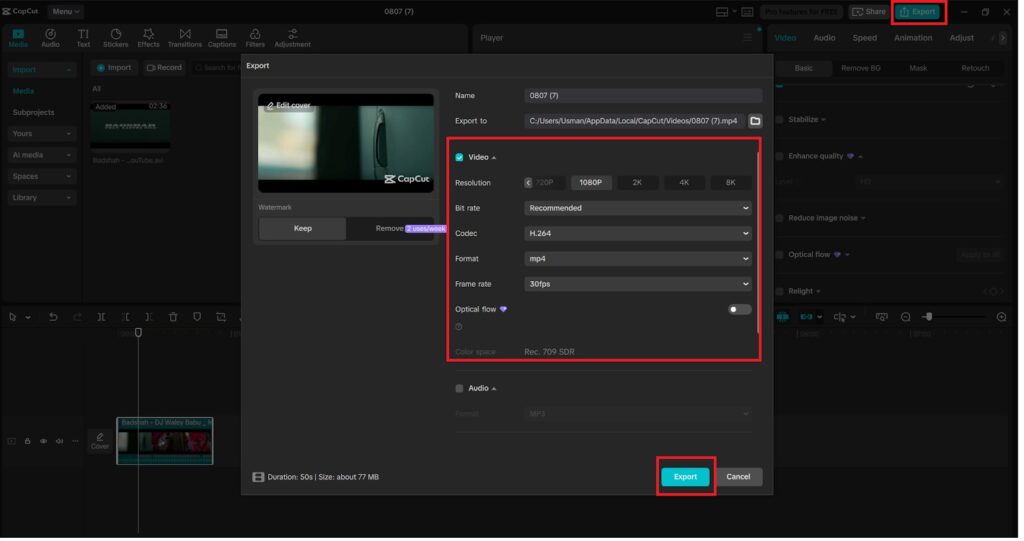
After being satisfied, one should click on “Export”. Select a resolution which suits your intended platform (HD, 2K, or 4K), and export it as MP4 or other necessary format. Your historical film is at the point where it can be introduced to new viewers!
Key CapCut Features That Make This Easy
CapCut is a complete AI-powered creative suite, and not a mere video editor. The following are the remarkable characteristics that make it suitable for archive restoration:
AI Video Upscaler – Smart means to clear & improve clarity and sharpness using resolution.
AI Video Generator – Best to place dull parts or fragments that need some dynamic effect in the form of visual images, transitions, or animated intros.
TexttoSpeech AI – If your old footage does not have any narration or audio, you can easily insert high-quality sounding voices and even different language voiceovers by using the text to speech AI feature in CapCut
Noise Reduction – Clearing to reduce bad sound on your initial video, removing background hiss, static, or hums.
Auto Subtitles – Automatically transcribe your footage and translate to add multi-language subtitles to reach a global audience.
Using these tools, one can transform an old, uncouth video and transform it into a highly viewable piece of media that must be good enough to fulfill the harshest digital niches.
Final Thoughts
You can make your archive into the digital world with CapCuts AI Video Upscaler, being involved in the hustle and bustle. So whether you need to recreate your content, manage your social media accounts, or use your cell phone to find nostalgic stories, CapCut will provide you with the tools to refresh, render, and share your old memories with all their glory.
And with features like AI video upscaler, AI voice generator, and text to speech AI, your old videos can do more than just play—they can inspire, educate, and entertain.